My Home Lab in 2026: What's Changed, What's New, and Why It Matters


A follow-up to my 2025 homelab post
When I published my homelab overview back in September 2025, I described it as "a personal data centre that mirrors enterprise environments." I meant that in an aspirational sense. Twelve months on, I think it's actually become true.
The core network is still the same — Unifi firewall, segmented VLANs, dual Pi-hole DNS, the Dell Micro 3080 running Proxmox. But almost everything built on top of that foundation has been upgraded, replaced, or significantly expanded. New services are running in Docker. Backups are automated and verified. The whole stack is accessible securely from anywhere. And increasingly, the homelab has become something I can point to directly in conversations about my cybersecurity career development.
This post walks through what's changed, what I've added, and what I've learned along the way.
The Network Foundation: Still Solid
The VLAN architecture I documented last year is unchanged and has held up well. For anyone coming to this post fresh, here's the current layout:
| VLAN | Purpose | Subnet |
|---|---|---|
| 1 | Management | 192.168.1.0/27 |
| 50 | Office | 172.16.17.0/25 |
| 100 | Home Lab | 172.16.17.128/25 |
| 300 | IoT | 172.16.18.0/25 |
| 310 | Cameras | 192.168.2.128/25 |
| 999 | Guest | 192.168.2.0/24 |
One correction worth noting from last year's post: the original VLAN table had a copy-paste error that listed VLAN 50 three times. That's been fixed. The camera and guest networks have always had their own IDs — they just weren't documented correctly.
The dual Pi-hole setup continues to work well. Pi-hole 1 handles the main network; Pi-hole 2 is dedicated to the IoT VLAN with its own upstream Cloudflare DNS. Having separate DNS servers per VLAN means I can apply different block lists to IoT devices without affecting the rest of the network, which turns out to be quite useful when you have smart home devices that constantly phone home.
Why it matters: Proper network segmentation is one of the most fundamental security controls in any environment. Demonstrating a working, documented VLAN architecture with different DNS policies per segment is directly relevant to infrastructure security roles.
Proxmox Backup Server: Taking Backups Seriously
Last year, I mentioned Veeam Backup & Recovery Community Edition for VM backups. That's been replaced with Proxmox Backup Server (PBS), running as a dedicated VM on the stack.
PBS integrates natively with Proxmox and gives me incremental, deduplicated backups with built-in verification. The backup target is a TrueNAS NFS datastore (truenas-backups), mounted over the local network. The result is a proper 3-2-1 backup chain:
- 3 copies of data
- 2 different storage types (local VM storage + TrueNAS NFS)
- 1 offsite copy (cloud, handled separately)
What I particularly like about PBS is the restore verification. It doesn't just take a backup — it verifies the data's integrity and alerts if anything is wrong. That's a significant step up from just hoping backups work until you need them.
Prune jobs are scheduled to maintain retention without filling the datastore — daily backups kept for 7 days, weekly for 4 weeks, and monthly for 3 months.
Why it matters: Backup and recovery is one of those skills that's easy to claim and hard to demonstrate. Being able to walk through a documented 3-2-1 strategy, explain deduplication and incremental backups, and show that restores are actually tested is a genuine differentiator in IT and security roles.
Traefik, Nginx Proxy Manager, and Wildcard SSL
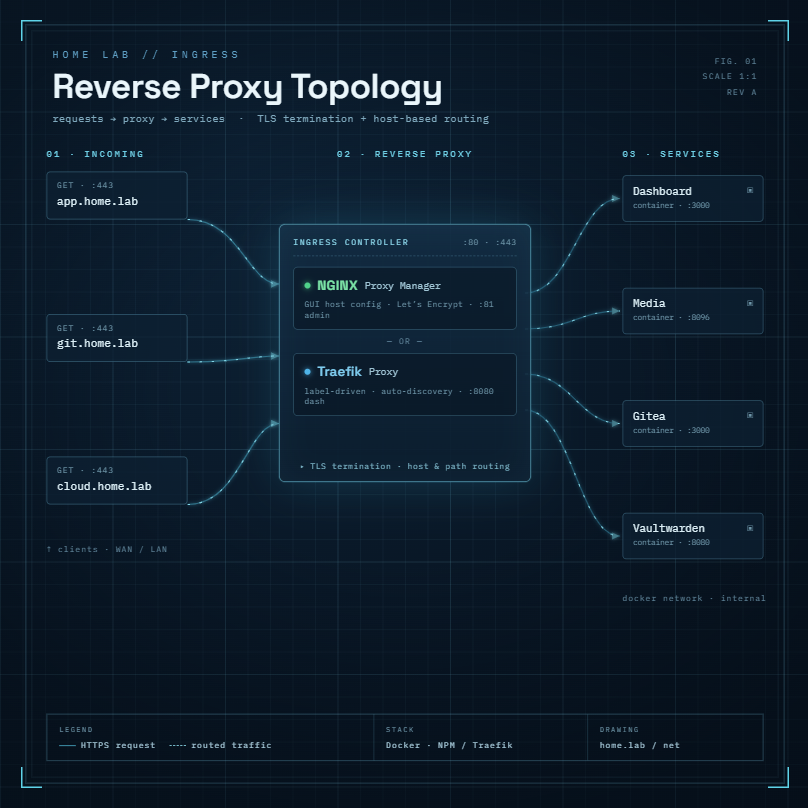
The reverse proxy setup has evolved into a split architecture — and it's worth explaining why, because it's a deliberate decision rather than an accident.
Traefik remains the reverse proxy inside the homelab, handling internal service routing across the VLAN 100 stack. It works well in a Docker environment, automatically detecting containers and dynamically configuring routes.
Nginx Proxy Manager (NPM) lives on a separate cloud VPS hosted on Hetzner, and handles all the public-facing services — Ghost CMS (this blog), Vaultwarden, and anything else that needs to be reachable from the internet. Keeping public-facing infrastructure off the homelab entirely is a conscious security decision: it means the homelab itself isn't directly exposed, and a problem with the cloud stack doesn't affect local services or the other way around.
The headline addition across both environments is a wildcard SSL certificate for *.jimgogarty.com, provisioned via the DNS-01 ACME challenge through Cloudflare. This means every subdomain — whether internal or external — automatically gets a valid, trusted HTTPS certificate, without a separate certificate request each time. The DNS-01 method is particularly useful because it works for services that aren't publicly reachable, which covers most of the homelab.
I did run into one issue worth documenting: an NPM outage on the Hetzner stack caused by a missing upstream definition in the nginx config — specifically a ghost_analytics proxy host that had been removed but was still being referenced. NPM silently failed on startup, which took some digging to diagnose. The fix was straightforward once identified, but it was a good reminder to keep proxy configurations tidy and to test after any changes.
Why it matters: Running split infrastructure — internal Traefik for homelab services, external NPM for public-facing ones — mirrors how organisations separate internal and DMZ-facing systems. Understanding certificate lifecycle management, ACME automation, and why DNS-01 challenges are preferable to HTTP-01 for internal services are all directly applicable skills in security and infrastructure roles.
GPU Passthrough: CasaOS and the Move to Jellyfin
One of the more technically satisfying projects this year was getting Intel UHD 630 GPU passthrough working from Proxmox to a CasaOS VM.
The original goal was hardware transcoding for Plex. Software transcoding is CPU-intensive and limits the number of streams you can run simultaneously. Passing the iGPU through to the VM means the media server can offload transcoding to the GPU, freeing up CPU resources significantly.
The process involved:
- Configuring IOMMU in the Proxmox host
- Binding the iGPU to the vfio-pci driver
- Passing the device through to the CasaOS VM
- Verifying the GPU was visible inside the VM with
lspci
After getting this working, I decided not to go ahead with a Plex Pass subscription — hardware transcoding in Plex is locked behind the paywall, and it's hard to justify the ongoing cost when Jellyfin does the same job for free, including hardware transcoding support out of the box.
The migration from Plex to Jellyfin is happening in the coming weeks. The main outstanding question before cutting over is TV client support — Jellyfin has native apps on Android TV, Google TV, Amazon Fire TV, and Roku, so most setups are covered. Confirming the app works on the living room TV is the last thing to verify before making the switch permanent. Once done, I'll update this post with a migration write-up.
Why it matters: GPU passthrough is an advanced virtualisation topic. Understanding IOMMU groups, driver binding, and PCI passthrough demonstrates a solid grasp of how hypervisors interact with hardware. The decision to move from Plex to Jellyfin is also a good example of evaluating total cost of ownership — a skill that comes up constantly in IT infrastructure roles.
Ghost CMS: Self-Hosting This Blog
This one is a bit meta. The blog you're reading is self-hosted, running Ghost CMS as a Docker container on the Hetzner cloud stack, with Nginx Proxy Manager serving the site and a wildcard SSL certificate.
Ghost is a modern, lightweight publishing platform that works well in Docker. Keeping it on the Hetzner VPS rather than the homelab means it stays reachable even if something goes wrong locally — a practical lesson in availability that you learn quickly when a real audience depends on the site being up.
What I've learned from running a production-ish service on infrastructure I own: uptime matters more when something real depends on it. The blog going down means the blog goes down. That's a useful forcing function for taking monitoring, backups, and update discipline seriously.
Why it matters: Running a real public service on your own infrastructure is a different discipline from just spinning up lab VMs. It introduces questions of availability, certificate renewal, container updates, and what happens when things go wrong with real consequences.
Vaultwarden: Self-Hosted Password Management
Vaultwarden is a lightweight, self-hosted implementation of the Bitwarden server, running as a Docker container on the Hetzner cloud stack alongside Ghost. It provides the full Bitwarden client experience — browser extension, mobile app, desktop app — backed by infrastructure I control.
Running your own password manager is a calculated risk. You gain full control and no dependency on a third-party service. You take on full responsibility for availability and backup. The tradeoff is worth it for a homelab environment where the goal is to understand these systems deeply.
The Vaultwarden instance is accessible via a subdomain through NPM, with the wildcard SSL certificate, and is backed up as part of the regular PBS backup schedule.
Why it matters: Password management and secrets handling are core security topics. Understanding how a password manager works at the server level — authentication, encrypted vaults, sync protocols — is relevant background for security roles, and running your own instance demonstrates hands-on familiarity with the concepts.
Homepage Dashboard: A Single Pane of Glass
The Homepage dashboard ties the whole stack together. It's a self-hosted start page that aggregates status and information from every service on the homelab into a single view.
Current widgets include:
- TrueNAS — pool status, disk health, available storage
- Proxmox — CPU, RAM, and VM status per node
- Pi-hole — query statistics and block rates per instance
- Uptime Kuma — service availability across the stack
- Plex / Jellyfin — active streams and library counts (will update once Jellyfin migration is complete)
- Traefik — active proxy hosts on the homelab
Getting all these widgets working cleanly required some troubleshooting — particularly around Docker socket permissions (GID alignment between the Homepage container and the Docker daemon) and Pi-hole v6's changed API format. Both are documented for future reference.
Why it matters: A dashboard like this is how a real NOC or security operations team gets situational awareness across an environment. Building and maintaining one — including fixing the inevitable integration issues — is practical experience with monitoring and observability.
The Cybersecurity Angle
Something has shifted in how I think about the homelab over the past year. It started as a place to learn IT skills. Increasingly, it's become a deliberate platform for building a cybersecurity career.
The additions this year weren't random. Each one maps to something that matters in security roles:
- PBS and 3-2-1 backups → incident recovery and data protection
- Split proxy architecture (Traefik internally, NPM on cloud) → network zoning, DMZ separation, certificate lifecycle management
- VLAN segmentation with documented policies → network security controls
- Vaultwarden on cloud VPS → secrets management, access control, availability planning
- GPU passthrough → advanced virtualisation skills
The next planned additions are specifically security-focused: deploying a SIEM (likely Microsoft Sentinel or a self-hosted Elastic stack), running OpenVAS vulnerability scans against the lab, and documenting the findings as a proper vulnerability management exercise.
The homelab has also become the source material for this blog, which is itself a portfolio piece. Writing up projects, documenting incidents, and explaining architectural decisions publicly is the kind of evidence that holds up in an interview in a way that a CV entry doesn't.
What's Still on the List
To be transparent, not everything is done. Outstanding items include:
- Completing the Plex to Jellyfin migration (pending TV client confirmation)
- Fixing PUID/PGID permissions for Radarr, Sonarr, and Transmission containers
- Evaluating an 8TB TrueNAS storage upgrade (2x 8TB WD Red Plus mirror, approximately €820 from Elara.ie)
- Deploying a SIEM tool for log aggregation and alerting
- Running and documenting a vulnerability scan exercise
The list never gets shorter — which is exactly how it should be.
Closing Thoughts
A homelab is never finished. That's the point. Every time something breaks, something new gets added, or something gets replaced with a better solution, there's an opportunity to understand how the technology actually works — not just how to use it.
If you're in IT and thinking about building a homelab, or if you already have one and haven't documented it properly, start now. The skills you develop are directly transferable. The documentation you produce is a portfolio. And the discipline of running real services on infrastructure you own and manage is the closest thing to enterprise experience you can get without working in an enterprise.
As always, if you're building something similar or have questions about any of the above, I'd love to hear about it.