Troubleshooting Like You Mean It: A Vaultwarden Story
An empty password vault, a calm process, and why the work log matters as much as the fix


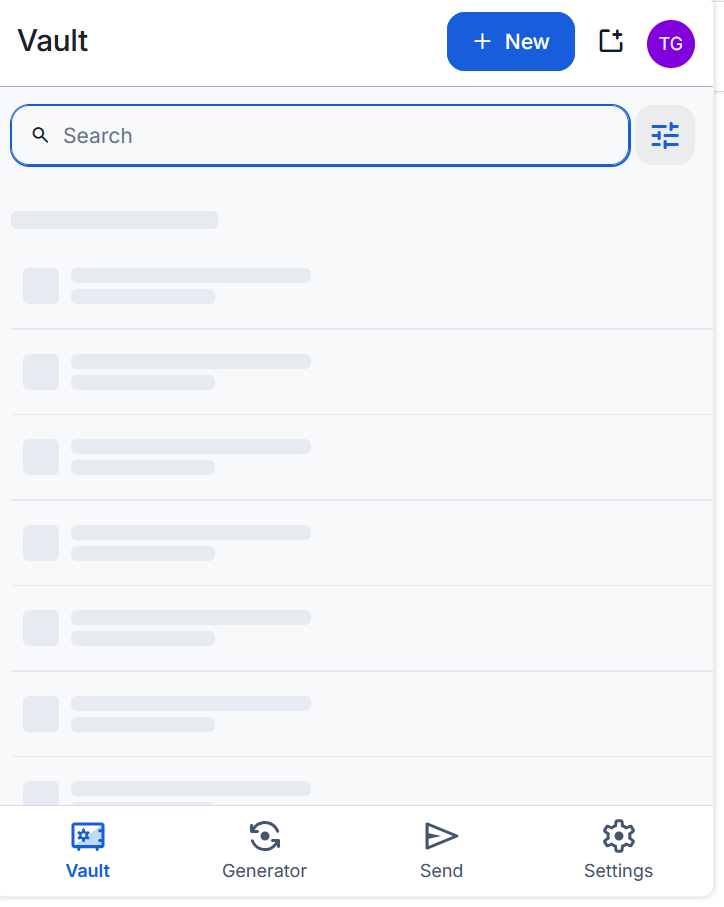
I opened my browser the other morning, clicked the Bitwarden extension, and my password vault was empty.
If you self-host anything important, you'll know the small cold feeling that comes with that. The vault is where everything lives. An empty vault is the sort of thing that makes you want to start clicking buttons — reinstall the extension, restart the container, restore a backup, do something. And that instinct, the urge to act before you understand, is exactly the thing that turns a ten-minute fix into a lost afternoon.
So this is a post about not doing that. It's a walk-through of how I actually worked the problem, using it as an example of how I think troubleshooting should be done — and, just as importantly, how you should be writing it down while you do it.
First rule: don't touch anything. Reproduce and observe.
The temptation is to fix. The discipline is to look first.
Before I changed a single thing, I wanted to know exactly what "empty vault" meant. Was I logged out? Was the vault locked? Was it loading and failing, or just not loading at all? Watching it closely, the extension looked like it was trying — the entries seemed to load, and then nothing happened. Login worked. It just never showed me anything.
That distinction matters. "Won't log in" and "logs in fine but shows nothing" point at completely different parts of the system. If you skip the observation step and jump straight to a fix, you're fixing a problem you haven't actually identified yet.
Second rule: isolate the variables. Find out where the fault isn't.
Half of troubleshooting is elimination. Everything that works is a clue because it tells you which parts of the chain are healthy.
So I checked the other ways into the same vault:
- The web vault, opened directly in the browser? Fine. All my entries, right there.
- The mobile app? Fine. Ran a manual sync, no problem.
- The extension, in a different browser? Same empty vault.
Now the picture sharpens. My data is fine — the web vault proves that. The server is reachable and serving — the web vault and mobile prove that too. The failure is specific to the browser extension, across browsers, and nothing else. That's not a "my vault got wiped" problem. That's a "one type of client can't render what the server is giving it" problem.
Notice I haven't fixed anything yet, and I've already ruled out data loss, a server outage, and a single-browser cache glitch. That's the value of isolation: you narrow the search space before you spend any effort.
The question I should have asked first: what changed?
I'll be honest about a gap in my own process here, because honesty is the useful part.
In a production environment, before I isolate anything, there's a question I ask reflexively: What changed? Systems that worked yesterday and don't today rarely break on their own. Something moved — a deployment, a config edit, a certificate rotation, an update. Nine times out of ten the answer is sitting in a change log, a ticket, or a "did anyone touch X last night?" message in the team channel. Finding the change often is finding the fault.
On this one, I didn't ask it early enough. I went straight to isolating clients and reading logs, and I got to the answer — but I got there the long way. The thing that had changed was the browser extension quietly auto-updating overnight. If my first move had been "what's different since this last worked?", I'd have thought to check the extension version and probably shortcut the whole investigation.
The lesson isn't that isolation and logs are wrong — they got me there. It's that "what changed?" belongs at the top of the process, and it's easy to forget at home precisely because there's no change board, no deployment pipeline, no colleague to ask. In a homelab, you are the change management. The auto-updates that make life easy are also the silent changes nobody logged. Ask the question anyway — and if you can't answer it, that's itself a signal about what you should be tracking.
Third rule: go to the logs, and read what's missing too
This is the step people skip, and it's the one that usually hands you the answer. The application is almost always telling you what's wrong — you just have to go and read it.
sudo docker compose logs vaultwarden -f --tail 30
Here's the thing about reading logs well: you're not just scanning for the word ERROR in red. You're reading the story of the requests, and paying attention to what should be there and isn't.
What I saw was a login that succeeded (connect/token => 200), a profile fetch that succeeded (200), a config fetch that succeeded (200) — everything coming back healthy — and the client still showing me nothing. When every request returns 200 and the client is still blank, you can cross a whole category of problems off the list. It isn't auth. It isn't the network. It isn't permissions. The server is answering correctly and the client is refusing to render the answer.
From isolating things earlier, I already knew the web vault and the phone were fine — it was the browser extension, across every browser, that stayed blank. Line up those three clients, and the thing that separates them is version. The web vault ships with the server, so it's always in step with it. The phone app hadn't updated in a while. The browser extension, though, had quietly auto-updated overnight — leaving it running newer code than the server was built to handle.
New client, older server, a sync that comes back fine but won't render: that's the classic shape of a version mismatch. The healthy 200s weren't a contradiction; they were the clue — the server was doing its job, and the newer client just didn't like the shape of the answer.
Fourth rule: form one hypothesis, then test it — don't shotgun
Once the evidence pointed in a direction, I confirmed it before acting. A quick search turned up that the Bitwarden clients had shipped a release that dropped some legacy fields that older self-hosted servers were still sending.
This is where discipline pays off again. The shotgun approach — reinstall the extension, clear the cache, rebuild the container, restore from backup — might eventually have stumbled onto the answer, but you'd never know which thing fixed it, and you'd have burned an hour and possibly made things worse.
One hypothesis, tested, is worth ten random changes.
The fix was to bring the server up to the release that restored compatibility:
sudo docker compose pull vaultwarden
sudo docker compose up -d vaultwarden
Then, a manual re-sync in the extension.
Fifth rule: "no error" is not the same as "fixed" — verify properly
After the upgrade, I could have just watched the empty vault fill up and called it done. But an absence of errors isn't proof of success; you want to see the thing that was broken now working for the right reason.
So I went back to the logs and watched a fresh login. This time the story was different:
POST /identity/connect/token => 200 OK
GET  /api/sync => 200 OK
GET  /api/tasks => 200 OK
There it is — /api/sync completing, then the client will fetch favicons for my actual entries. That's not just "the error stopped"; that's positive evidence of the mechanism working end to end. The vault is populated because the sync now renders, and I can see it doing so.
That's the difference between hoping it's fixed and knowing it is.
The other half: write it down while it's fresh
Here's the part people leave out. Solving the problem is only half the job. The other half is capturing it so the next hour of your life — or someone else's — isn't spent rediscovering what you already learned.
I keep a work log for exactly this. The moment the fix was verified, I wrote up the incident: the symptoms, the diagnosis, the root cause, the resolution, and the verification. Not a novel — a tight, skimmable entry that a tired version of me at 2 am could follow.
A good troubleshooting log answers a few questions cleanly:
- What did I see? The exact symptoms, not a vague memory of them.
- How did I narrow it down? The isolation steps, so the reasoning is reproducible.
- What was actually wrong? The root cause, stated plainly — "client update dropped legacy fields the old server was sending," not "it was a version thing."
- What did I do? The exact commands, so it's copy-pasteable next time.
- How did I confirm it worked? The verification, so "fixed" means something.
Write it while it's fresh. The details you think you'll remember — the exact version numbers, the specific log line, the command that did it — evaporate within a day. The log is worth most when written within the hour.
Advice is cheap, though, so here's the actual entry I wrote for this incident — lightly cleaned of internal hostnames, but otherwise the real thing. This is the shape I'm talking about: skimmable, specific, and structured so any section can be read on its own.
## Vaultwarden — Browser extension shows empty vault

Date:    2026-08-05
System:  Vaultwarden (self-hosted, Docker Compose)
Status:  Resolved — no data loss

Summary
  Bitwarden browser extension stopped showing any vault entries,
  across multiple browsers. Web vault and mobile app unaffected.
  Root cause was an auto-updated browser client incompatible with
  the older self-hosted server. Fixed by upgrading the server and
  re-syncing.

Symptoms
  - Extension: entries appear to load, then nothing renders.
  - Reproduced in multiple browsers -> rules out local cache.
  - Web vault (opened directly): all entries present, working.
  - Mobile app: working; manual sync succeeded.

Diagnosis
  - Logs showed login, profile and config all returning 200 OK,
    yet the client still rendered nothing.
  - Healthy responses + blank client + failure only on the
    independently-updating client = version-mismatch fingerprint.

Root cause
  - Browser client auto-updated to 2026.7.0, which dropped legacy
    fields the older server (<= 1.36.0) was still relying on.
  - Web vault is served by the server, so always version-matched;
    mobile hadn't updated yet.

Resolution
  - Upgraded Vaultwarden to 1.37.1:
      sudo docker compose pull vaultwarden
      sudo docker compose up -d vaultwarden
  - Forced a manual re-sync in the extension.

Verification
  - Logs now show GET /api/sync => 200, followed by the client
    fetching entry favicons. Vault renders in all browsers.
That took two minutes to write and it's now the thing I'll reach for if this ever recurs — or if someone else hits the same wall. Notice it mirrors the process itself: symptoms, how I narrowed it, root cause, what I did, how I confirmed, and the one thread left open. The log is the troubleshooting, written down.
The takeaway
The fix here was genuinely small — pull a newer image, re-sync. But the fix was never the point. The point is the process that got me there without panic and without collateral damage:
- Ask what changed — it's often the fastest route to the fault.
- Observe before you touch anything.
- Isolate — find out where the fault isn't.
- Read the logs, including what's missing.
- Form one hypothesis and test it.
- Verify positively; "no error" isn't "fixed."
- Write it down while it's fresh, including open threads.
Do that consistently, and troubleshooting stops feeling like luck. It becomes a repeatable process you can lean on when the vault is empty, and the cold feeling is telling you to start clicking buttons. Don't click buttons. Read the logs and take notes.
Do that consistently, and troubleshooting stops feeling like luck. It becomes a repeatable process you can lean on when the vault is empty, and the cold feeling is telling you to start clicking buttons. Don't click buttons. Read the logs, and take notes